
Reference
Transparency and privacy
Anyone can see every donation and how the money was used, without signing in. Patients and donors stay private. This page explains both promises.
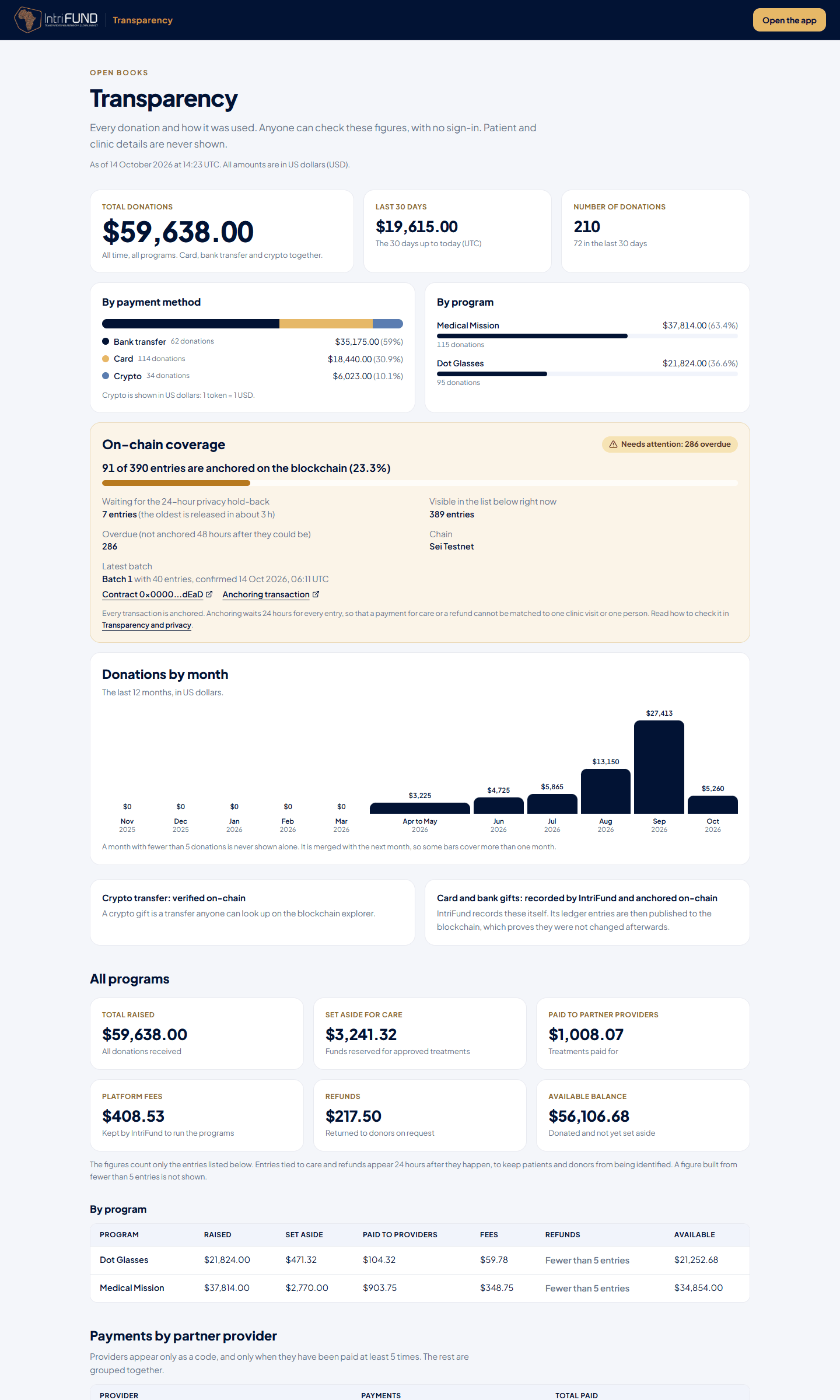
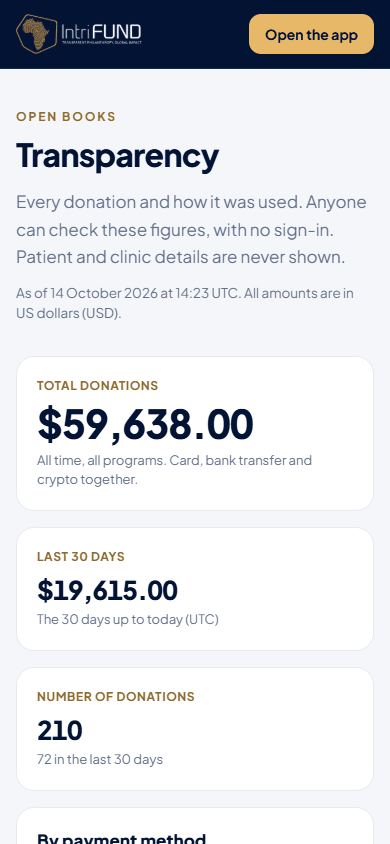
Everything on this page is readable on a small screen. The totals stack one under the other, and Verify opens under each entry.
What you can see
- At the top: the total donations of all time, the last 30 days and the number of donations; donations by payment method (Card, Bank transfer, Crypto) and by program; and a chart of donations for each of the last 12 months. Crypto is shown in US dollars: 1 token is worth 1 dollar.
- An On-chain coverage panel that shows how much of the ledger is anchored on the blockchain.
- Where card and bank gifts are converted to tokens, a Proof of reserves panel (see below).
- Totals for all programs and for each program: raised, set aside for care, paid to partner providers, platform fees, refunds and the available balance. All amounts are in US dollars.
- A list of every ledger entry. You can search it, filter it, page through it and download the filtered view as a CSV file.
- For each entry: a public reference such as LED-1A2B3C4D, the day, what happened in plain words, the program, the exact amount, how a gift was paid (Card, Bank transfer or Crypto) and its own link to the blockchain transaction. Under every entry, a Verify panel lets you check it yourself.
| Entry type | What it means |
|---|---|
| Donation received | A gift arrived in a program. |
| Funds set aside for care | Money reserved for an approved treatment. |
| Paid to a partner provider | Money paid out for a treatment. The provider is not named. |
| Platform fee | The share IntriFund keeps to run the programs. |
| Refund to donor | A donor took back unused money. |
| Provider withdrawal | A partner provider moved its earnings out. |
What is never shown
The page never shows anything that could identify a patient, a clinic or a donor. In particular:
- Names, Member IDs, application codes, service request numbers and pre-authorisation references.
- Diagnoses, procedure and service names, and medical codes.
- Provider names, clinic addresses, donor names, email addresses and wallet addresses.
- The transaction hash of a donor’s own payment.
How privacy is protected
| Rule | How it works |
|---|---|
| Opaque references | Each entry gets a code made with a secret key held only by IntriFund. It cannot be worked back to a ledger number, and the codes do not run in order. |
| Donor codes | A donation shows a code like DON-AB12CD instead of a name. The same donor always has the same code. |
| Provider codes | Providers appear only in a summary table, as a code like PRV-AB12CD. A provider needs at least 5 payments to get its own row. The rest are grouped as Other providers. |
| Fewer than 5 | A total or a count made from fewer than 5 entries is shown as Fewer than 5 entries. We never say how many people were helped when that number is under 5. |
| A delay | Entries tied to care, and refunds, appear 24 hours after they happen. Donations appear straight away. |
| Day only | Dates show the day, never the time. The order of entries does not follow the order they were filed. |
These rules are applied on our servers before anything is sent to your browser. They are not a matter of hiding things on screen.
Crypto and card gifts
| Gift type | What backs it |
|---|---|
| Crypto | Crypto transfer: verified on-chain. The transfer can be looked up on the blockchain explorer. |
| Card and bank | Card and bank gifts: recorded by IntriFund and anchored on-chain. IntriFund writes the entry, then publishes it to the blockchain so it cannot be changed quietly afterwards. |
An entry that has not been published yet shows Waiting to be anchored. Entries are published in small batches, so there can be a short wait.
Every transaction is anchored
Every entry in the ledger is written to the blockchain. That covers donations, funds set aside for care, payments to partner providers, platform fees, refunds, refund fees and provider withdrawals. None is left out. A rule in our code checks this: if a new kind of entry were ever added without a way to anchor it, our automatic tests would fail and the change could not be released. An entry we cannot classify is never anchored by guesswork and never dropped. It is counted, flagged to the managers, and stops further anchoring until a person has fixed it.
The 24-hour hold-back
Anchoring waits 24 hours for every entry. Entries about care, and refunds, are also shown on this page only after the same 24 hours. The wait stops anyone from matching a line on this page, or a fingerprint on the blockchain, to one clinic visit or one person. When the 24 hours are over, the entry is added to the next batch. The wait is not a gap in the record: the entry is already in our ledger and is counted in the coverage panel while it waits.
How to read the coverage panel
- N of M entries are anchored: M is every entry in the ledger, N is how many are already on the blockchain, and the percentage is N divided by M. It is below 100% only while entries wait for the hold-back.
- Waiting for the 24-hour privacy hold-back: entries that are too new to anchor. When fewer than 5 are waiting, the page says so instead of giving the number.
- Latest batch: the number of the last confirmed batch, how many entries are in it, when it was confirmed, and links to the contract and the transaction on the blockchain explorer.
- Green means nothing is overdue. Amber means at least one entry is still not anchored more than 48 hours after it could have been. That number should always be 0, and our managers are alerted when it is not.
Small numbers
A payment method, a program or a month with fewer than 5 donations is never shown on its own. It is merged into another group, or left out. A month with no donations at all is shown as zero. Because of this, the bars in the monthly chart can cover more than one month.
How to verify an entry
Every entry has a Verify panel under it. Press it to see the entry’s fingerprint and the exact text that was hashed. Hash that text with any SHA-256 tool and the result must match. If the entry has its own blockchain transaction, open the link in the Proof column and check that the transaction exists. For entries grouped in a batch, press Check in your browser to run three checks that do not depend on our server.
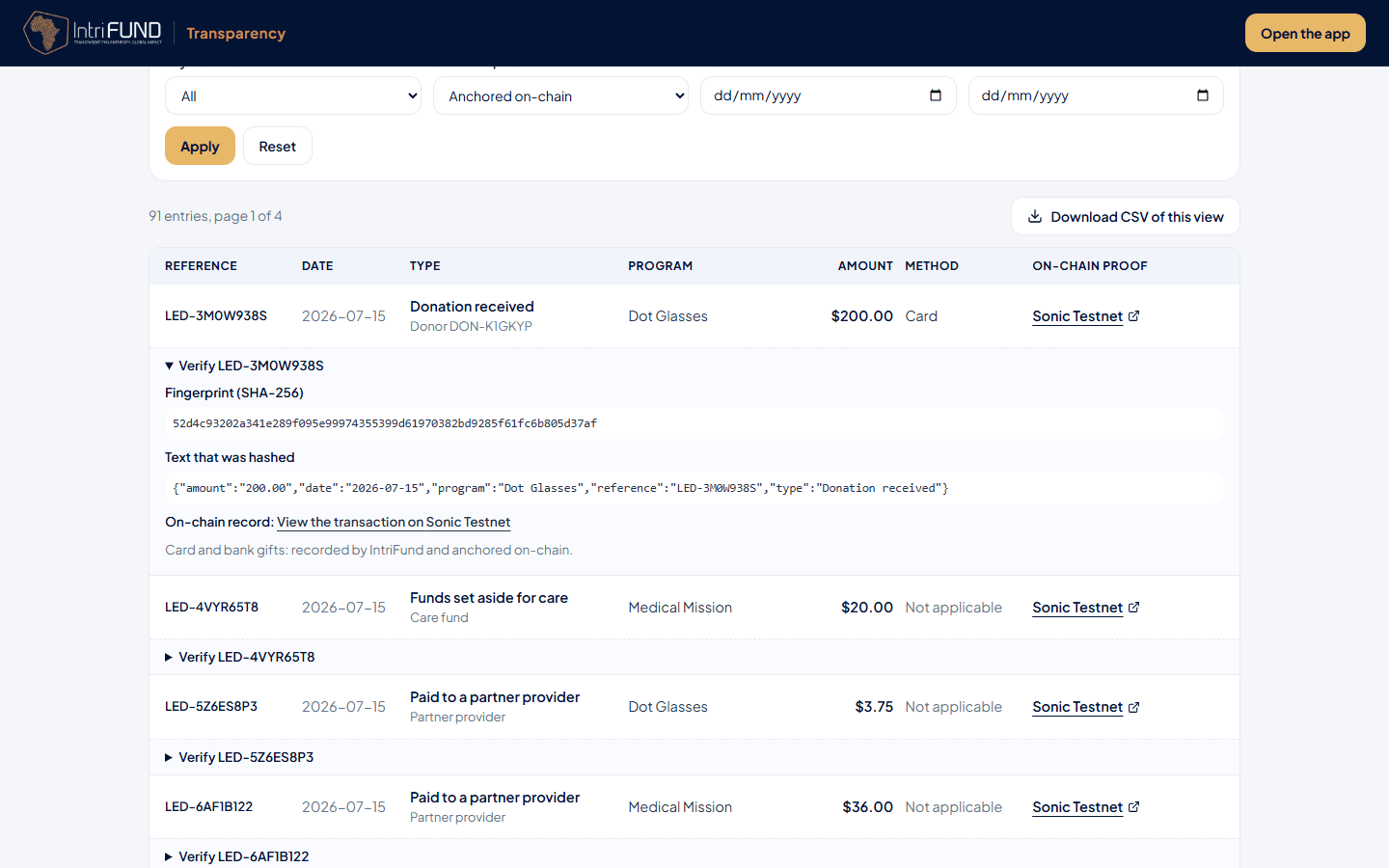
The full step-by-step guide, including what the three checks mean, is on Blockchain and tokens.
Proof of reserves and tokens
Every gift is matched by the same number of USDIntrifund tokens, at 1 token for 1 US dollar. Where it is switched on, a Proof of reserves panel compares the tokens held with what the ledger says should be held, and each card or bank gift shows Converting, then a link called Converted to USDIntrifund. A crypto gift shows Paid in tokens.